
CRM for Fundraising: How to Choose and Use the Right Platform

If you’ve ever managed a fundraising campaign, you know how important it is to keep track of donors, organize campaigns, and build lasting relationships. As the world of nonprofit fundraising grows more competitive, organizations are turning to CRM (Customer Relationship Management) platforms to streamline their efforts. In fact, according to a Nonprofit Tech for Good survey, more than 60% of nonprofits use a CRM to manage their donor data and fundraising activities.
But finding the right CRM isn’t always simple. With so many options out there, each offering unique features and pricing, making a choice can feel overwhelming—especially if your team is juggling lots of responsibilities. The right CRM, though, doesn’t just store names; it helps you engage supporters, raise more money, and work more efficiently.
This guide will break down what to look for in a fundraising CRM, introduce you to popular platforms, and share practical steps to help you choose the best tool for your organization’s needs. Whether you run a small team or a large nonprofit, the right approach can make all the difference in bringing your mission to life.
Why a CRM Matters for Fundraising Success
How CRMs strengthen donor relationships
Excel spreadsheets might keep a donor list in order, but they can’t reveal the story behind each gift. A good CRM builds a memory for your organization, connecting every email, event RSVP, and donation. Over time, this creates a detailed picture of what inspires supporters, when they’re most responsive, and how they want to engage. With these insights, fundraisers can respond at just the right moment—sending a thank you call to a first-time donor, or inviting a repeat supporter to a special event tailored to their interests. The result is a deeper sense of connection, and donors who feel truly valued, not just solicited.
The impact on team productivity and fundraising results
Without a CRM, keeping track of fundraising tasks often falls to Post-it notes, crowded inboxes, or someone’s memory (until they go on vacation). With the right platform, every team member sees what’s happening, from major gift asks to volunteer outreach. Task management, reminders, and real-time progress updates keep things moving forward. That means less time digging for information and more time building genuine support. Reporting and analytics also make it clear what’s working and what needs adjustment—so teams can celebrate wins and fix bottlenecks before they impact revenue.
While a CRM is a powerful tool, not every platform is built the same. It’s smart to look beyond buzzwords and narrow in on the features that really drive fundraising forward. Next, we’ll explore what makes for a truly standout solution.
Essential Features to Look for in a Fundraising CRM
Donor profiles and giving history
The heart of fundraising is relationships. The right CRM builds a living story around every donor, tracking their contact info, past donations, event attendance, and volunteer activities—all in one timeline. This history helps you understand what inspires your donors and when to reach out for the greatest impact.
Campaign and event management
Running multiple campaigns or events isn’t easy, but your CRM should make it feel seamless. Look for tools that let you plan, launch, and measure campaigns from one dashboard, track RSVPs, manage tables, and connect every ticket sold (or seat sponsored) straight back to a donor’s profile.
Donation processing and receipts
Turn giving into a frictionless experience. The CRM should process one-time and recurring donations online (and offline), auto-generate thank-you emails and tax receipts, and reconcile all gifts—right down to matching gifts or pledge reminders. Simplicity here keeps donors coming back.
Automated messaging and donor segmentation
Not every donor needs the same message. Good CRMs let you group donors into meaningful segments (“monthly givers,” “lapsed supporters,” “major prospects”) and trigger personalized emails, texts, or even handwritten notes at just the right time—without clogging your calendar with reminders.
Analytics, reporting, and dashboards
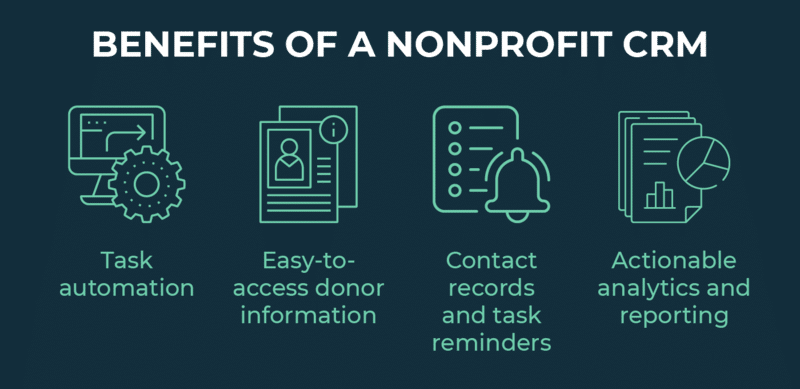
To steer your fundraising efforts, you need more than totals; you need insights. Choose a CRM with dashboards that track campaign performance, donor retention, acquisition costs, and year-over-year trends. These visuals turn raw data into clear next steps for your team.
Integrations with other fundraising tools
Your CRM doesn’t live in a vacuum. It should connect with your email platform, accounting software, payment processors, and even event ticketing tools. The easier it syncs, the less time you’ll waste copying and pasting—and the better connected your data will be.
Security and compliance
Protecting donor information is non-negotiable. The CRM you choose must encrypt sensitive data, offer user permissions, and comply with regulations like GDPR or IRS standards. When donors trust you with their details, your system needs to honor that promise.
Once you know which features really make a difference, exploring your platform options with a critical eye becomes much easier—helping you zero in on the best fit for your fundraising needs.
Popular CRM Options for Fundraising Organizations
The world of fundraising CRMs offers an impressive variety of platforms, each designed to meet the nuanced needs of nonprofits. While some options focus on simplicity and affordability, others shine when it comes to robust customization or advanced donor insights. Here’s a rundown of the most widely-adopted CRMs, highlighting what makes each solution stand out for fundraising teams.
Bloomerang
Bloomerang focuses on donor retention, offering an intuitive dashboard, clean donor timelines, and dedicated tools to keep supporters engaged year after year. Its built-in email marketing and survey tools are especially handy for cultivating relationships and tracking giving trends.
Salesforce Nonprofit Success Pack
Salesforce’s Nonprofit Success Pack transforms the powerful Salesforce platform into a customizable fundraising hub. It’s ideal for teams needing advanced automation, scalable integrations, and granular donor segmentation—though it may require more onboarding and setup than plug-and-play systems.
Blackbaud Raiser’s Edge NXT
Raiser’s Edge NXT is a long-standing favorite among mid-sized and large nonprofits. Its strengths lie in deep donor analytics, flexible event and volunteer management, and built-in payment processing—all with robust support for multi-channel fundraising.
DonorPerfect
DonorPerfect offers powerful customization and strong reporting tools without steep learning curves. Features like personalized thank-you messages and recurring donation options make it a reliable all-in-one solution for small and growing organizations.
Virtuous
Virtuous centers on “responsive fundraising,” blending automation with smart donor insights. Automated workflows, multi-channel engagement, and powerful integrations equip teams to respond thoughtfully to each donor, boosting outreach success.
Kindful/Bonterra
Kindful, now part of Bonterra, emphasizes clarity and ease of use with its modern design. The platform seamlessly connects with popular fundraising and accounting tools, simplifying tasks like online giving, donor tracking, and campaign management.
Keela
Keela is built for nonprofits hungry for actionable data. It automates administrative tasks, flags donors likely to give again, and unites project management with fundraising in one dashboard.
Little Green Light
Little Green Light is loved by small teams for its affordable pricing and no-nonsense approach. It handles constituent management, event tracking, and pledge processing—perfect when you need reliable performance over flashy extras.
Neon CRM
Neon CRM shines with its fundraising event management and customizable donor journeys. Its comprehensive mobile features and flexible integrations make it a smart pick for organizations that rely heavily on event-based or grassroots fundraising.
With a sense of what’s possible, you’re ready to narrow your choices and dig into the most important steps for finding the ideal CRM that will help your organization thrive.
Steps to Finding the Right Fundraising CRM
Define your fundraising needs and team size
Before diving into software options, take a close look at what your organization actually needs. Are you focused on major gifts, event fundraising, or managing lots of small donors? Consider your team’s size and skill level. If you have a solo fundraiser wearing many hats, simplicity matters more than endless customization. Sit down and list your non-negotiables—like event tracking, recurring gifts, or peer-to-peer fundraising support.
-1.png?width=471&height=508&name=Beige%20Minimalist%20Selfcare%20Affirmation%20Checklist%20(1)-1.png)
Think of this as your “shopping list.” Refer to it every time you narrow your options—this keeps you focused and makes comparison easier.
Evaluate your budget and expected ROI
Costs vary wildly. Some CRMs start free, while others charge hefty monthly fees. Look beyond the sticker price—factor in setup, extra features, and support costs. Consider how much more fundraising you could do with better tracking, automation, or insights. Sometimes a slightly pricier CRM pays for itself by saving staff hours or boosting donation levels.
Request demos and test support
Don’t fall for screenshots and sales pitches alone. Schedule live demos and ask the tough questions. If possible, get access to a free trial. See if the CRM really feels intuitive, or if you’re left guessing how to find donor info. Try out their support chat or help desk, too—you want quick, friendly answers when you need help most.
Check reviews from organizations like yours
Skip the generic testimonials and ask peers what’s really working for them—especially those with a similar mission, staff size, or fundraising style. Look for user groups, online forums, or case studies highlighting both the good and the headaches. Real-world feedback can spotlight hidden strengths or bottlenecks you’d never spot in a demo.
Plan for onboarding and staff training
Ensure that your new system doesn’t gather dust because no one can use it. Map out a realistic transition plan, set aside time for learning, and make sure help is available when questions pop up. Some vendors offer full onboarding packages, videos, or even on-site workshops. Smooth rollouts mean your team actually uses and benefits from the new CRM from day one.
Once you’ve selected your platform, making the most of it involves more than just logging in. Let’s look at simple ways to ensure your CRM truly powers up your fundraising efforts.
Tips to Get the Most from Your Fundraising CRM
Clean and organize your current donor data
Before you migrate to a new CRM—or even as you maintain your current one—take a close look at your donor list. Merge duplicate profiles, fill in missing email addresses, and remove outdated or incomplete entries. A tidy database streamlines every task: segmenting donors is faster, and personalized communications actually reach the right people.
Set measurable goals for CRM use
Decide what you’re hoping to accomplish, whether it’s increasing annual giving by 20% or growing your monthly donor list. Enter these goals into your CRM or use its dashboard features to track progress in real time. When your targets are specific and visible, your team is more likely to stay focused—and spot early when strategy isn’t working.
Automate repetitive fundraising tasks
Put your CRM’s automation tools to work. Schedule recurring receipts for donations, set up welcome sequences for new supporters, and trigger thank-you messages after special events. Automation frees up your team to focus on relationship-building instead of chasing paperwork or manually sending reminders.
Regularly review reports and adjust strategy
Don’t let data pile up unused. Block out time each month to check which campaigns performed best, where donors dropped off, and what types of outreach are most effective. Use these insights to update your calendar, tailor your messaging, or test a new approach. The power of a CRM lies in using its data, not just collecting it.
Once your CRM is working for you, it’s natural to have questions—especially if you’re just starting or want to level up your results. Let’s answer some common queries and clear up the trickiest points about fundraising CRMs.
Frequently Asked Questions About CRM for Fundraising
Do small nonprofits need a CRM?
Even small nonprofits benefit from a CRM. It’s not just about managing large amounts of data—you can keep better track of supporters, avoid missed thank-yous, and spend more time fundraising, not building spreadsheets. Simple CRMs are affordable, easy to use, and built to grow with your organization.
Can a CRM handle online and offline donations?
Yes. Most fundraising CRMs let you record both online gifts and checks received in the mail. You’ll see donor history all in one place—whether someone gives through your website, at an event, or by mailing a donation. This gives you a full picture of each supporter’s giving habits.
How long does CRM setup take?
Setup varies depending on the platform and your data’s complexity. Some CRMs are ready to use in a few hours, while migrating data and customizing fields can take a few weeks for larger organizations. Expect a short learning curve, and be ready to invest time upfront for long-term gains in efficiency.
Understanding the basics is just the start. The real results come from putting your CRM to good use—organizing your donor data, setting clear goals, and tapping into time-saving features. Let’s explore how to get the most from your new platform.